

 Runway AI has become one of the world’s most influential AI companies. Time magazine recognized this achievement in June 2023 . The New York-based AI powerhouse raised $141 million in funding at a $1.5 billion valuation , which shows the tech industry’s confidence in its groundbreaking approach to video creation.
Runway AI is a complete creative platform that reshapes the scene of video production. The platform makes professional-quality content creation available through artificial intelligence . Its video generator comes with powerful features like text-to-video generation, image-to-video conversion, and advanced video editing tools . The platform goes beyond video and offers 32 different media tools for various editing needs , making it a versatile solution that creative professionals can rely on.
Recent studies show that 90% of C-level leaders have gone through digital transformations . Runway AI’s pricing structure reflects this move toward AI-powered workflows. Users can choose from five different plans that match their needs. These plans start from a free tier with limited credits and go up to an Unlimited Plan at $95 monthly . This complete Runway AI review will share insights from 30 days of hands-on testing by exploring generation quality and ground applications.
What Is Runway AI and How Has It Evolved?
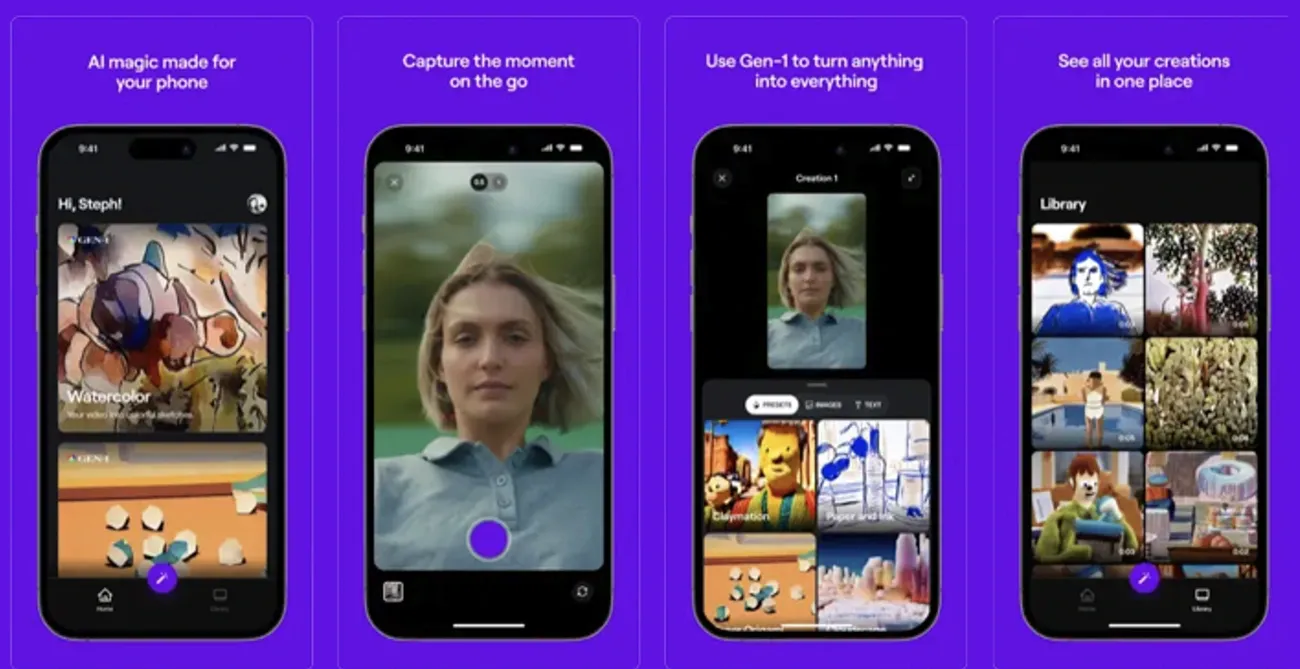
Image Source: TechCrunch
“Each generation has solved specific problems, but Gen 4 represents the first time AI video generation supports coherent narrative filmmaking with impressive style consistency.” — Vidpros Editorial Team, Professional reviewers and analysts in AI video production
Three visionaries started Runway AI (also known as RunwayML) in 2018. Chileans Cristóbal Valenzuela and Alejandro Matamala, along with Greek Anastasis Germanidis, met at New York University’s Tisch School of the Arts [1]. This American company quickly became a game-changer in the generative artificial intelligence world. They focused on creating sophisticated tools for video, image, and multimedia content generation.
Founders and company background
The startup’s growth has been remarkable. Runway secured its original $2 million in 2018 to build its AI platform. The company drew larger investments steadily: $8.5 million in Series A funding (December 2020), $35 million in Series B (December 2021), and $50 million in Series C (December 2022) [1]. A massive breakthrough came in June 2023 with a $141 million Series C extension that valued Runway at $1.5 billion [1]. This substantial backing from tech giants like Google, Nvidia, and Salesforce showed the tech sector’s confidence in Runway’s innovative approach to AI-powered creative tools [1].
Runway AI operates from its New York City headquarters with 228 employees [2]. The company sits at the crossroads of technology and creativity. Time magazine’s recognition of Runway as one of their 100 Most Influential Companies in 2023 cemented its position in the industry [1].
From Gen-1 to Gen-4: A quick timeline
Let’s take a closer look at Runway’s rise through its groundbreaking AI models:
-
Gen-1 (February 2023): Runway’s first commercial video-to-video system combined new videos by applying style and composition of an image or text prompt to existing source videos [1]. This marked Runway’s entry into publicly available foundational video generation models.
-
Gen-2 (February 2023): Released with Gen-1, this multimodal AI system expanded capabilities to generate entirely novel videos from text, images, or video clips [1]. Gen-2 became one of the first commercially available text-to-video models in the market.
-
Gen-3 Alpha (Mid-2024): A new infrastructure designed for large-scale multimodal training helped Gen-3 deliver major improvements in fidelity, consistency, and motion quality [1].
-
Gen-4 (March 2025): Runway’s most advanced model tackles long-standing challenges in AI video generation [1]. Gen-4’s breakthrough feature maintains consistent characters, objects, and environments across different scenes using reference images and text prompts [1]. This solved a critical problem that made AI-generated content appear disjointed.
What makes Runway AI different from other tools
Several distinctive characteristics set Runway apart from competitors. The company develops proprietary foundational model technology designed for professionals in filmmaking, post-production, advertising, and visual effects [1]. Instead of basic templates, Runway strengthens users with fine-tuning capabilities that optimize workflows without sacrificing artistic control [3].
Runway’s detailed toolkit has sophisticated features like AI green screen (background removal without traditional chroma key setups), automatic object detection, scene segmentation, and motion tracking [3]. These tools help editors work with complex footage or visual effects that would need expensive equipment or manual processes.
Runway Studios, their entertainment and production arm, produces and funds films, documentaries, printed publications, music videos, and other media [4]. This shows Runway’s commitment to practical applications of its technology.
Teams can access, edit, and comment on projects together in real-time [3]. Agencies, production teams, and remote creative collaborators benefit from this feature to maintain version control and communication throughout the editing process.
Runway AI’s most important distinction lies in its research mission – creating “general-purpose multimodal simulators of the world” [4]. This forward-looking vision goes beyond current applications toward creating sophisticated AI systems that understand and generate diverse types of media and their interactions.
30 Days with Runway Gen-4: My Real-World Testing Experience

Image Source: YouTube
My month-long experiment with Runway Gen-4 revealed its strengths and limitations. This hands-on experience tested the tool’s capabilities in creative projects of all types.
Setup and onboarding process
Runway Gen-4’s setup turned out to be simple. The Runway ML website welcomed me with an easy-to-use dashboard that showed me the basics. Without doubt, this intuitive approach explains the positive feedback in many user reviews. The clean layout helped me find the “Generate Video” button on the left panel as I started my experience [5].
The first step needed me to pick Gen-4 or Gen-4 Turbo from the model selector at the bottom left [6]. New users benefit from a rich help center packed with tutorials that make learning easier—a feature many users praise in their reviews [5].
Daily usage patterns and learning curve
The basics of Gen-4’s image-to-video process became my first focus. Each project starts with an input image that sets the visual tone and serves as the video’s first frame [6]. Text prompts worked best when they described motion rather than repeating what the reference image already showed.
My daily routine included:
-
Picking or making a reference image
-
Writing motion-focused text prompts
-
Deciding between 5 or 10-second clips based on complexity
-
Setting the right resolution
-
Using Fixed Seed when I needed consistent results
The challenge grew as I learned advanced features like keeping characters consistent between scenes. Week two brought a breakthrough—I could create videos with visual consistency, which shows how far AI video creation has come [7].
Video quality and consistency results
Gen-4’s “visual memory” stands out as its best feature. The model manages to keep a character’s or object’s look consistent throughout the video once it processes the reference image [1]. This consistency shows in lighting, locations, and style, solving a common problem in AI videos.
The 720p resolution videos sometimes showed quality issues. Fast movements could look blurry or distorted [2]. The model’s physics simulation has improved from earlier versions, though some movements still look artificial [2].
Prompt accuracy and generation speed
Runway works substantially faster than other tools [2]. The Turbo version offers better speeds at lower cost, making it perfect to test ideas before using the standard Gen-4 model [6]. Clear, direct prompts worked better than casual language in my tests [8].
Reference images work best with simple prompts about movement instead of long descriptions of what’s already there [2]. To name just one example, “Subject jumps with excitement, arms raised high” produced better results than detailed scene descriptions [2].
Gen-4’s ability to create consistent characters from a single reference image amazes me [7]. Creators can now place their subjects in different settings while keeping their look intact—this changes everything for storytelling.
The platform sometimes shows what users call “hallucinations” where it ignores instructions, but these decreased as my prompt writing improved over the month [2]. The model’s accuracy and speed make Runway Gen-4 a powerful tool, even with its occasional quirks.
Runway AI Video Generator: Key Features I Used Most
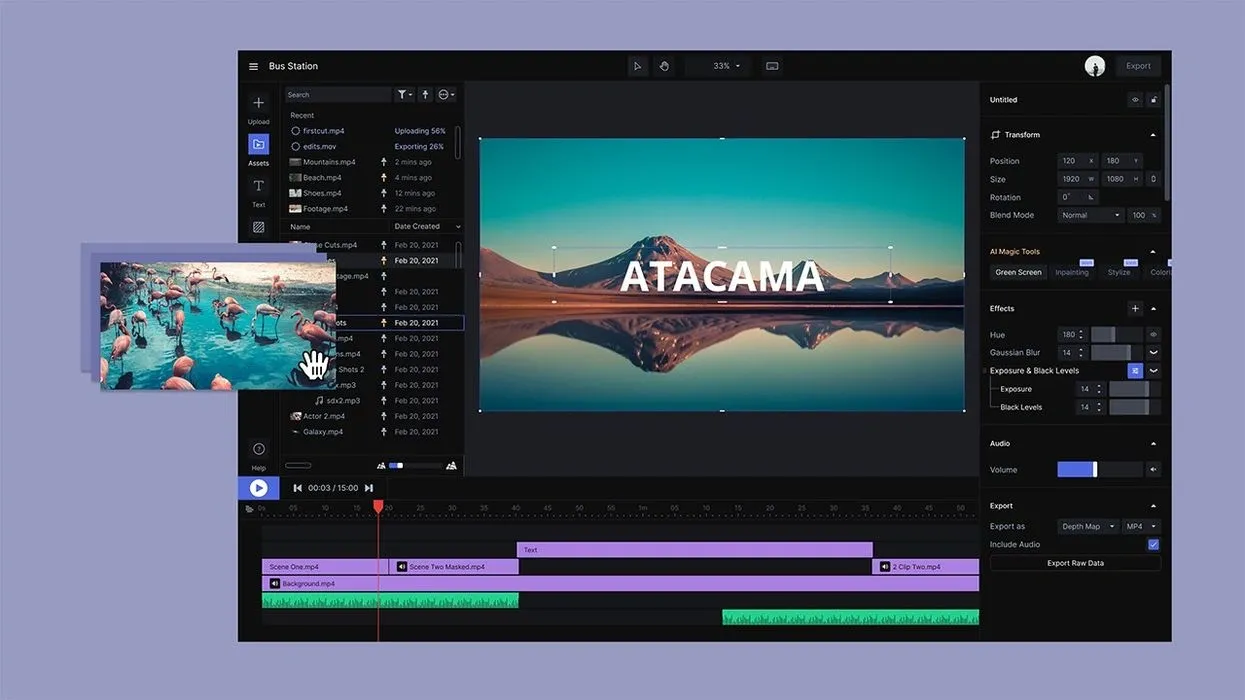
Image Source: No Film School
My 30-day testing of Runway AI revealed several standout features that became essential to my creative workflow. The platform’s detailed toolkit helped me discover video generation techniques that usually need expensive equipment or special training.
Text-to-video generation
Runway’s text-to-video feature turns written descriptions into dynamic visual content. The system takes detailed text prompts and creates video clips lasting 3-8 seconds. These clips work great for social media posts or as parts of bigger projects. During testing, I used two main resolution options: 576×1024 (portrait) and 1024×576 (landscape).
The AI’s ability to understand artistic direction amazed me. My prompts included styles like “photographic,” “watercolor,” or “cinematic lighting,” and the results stayed consistent across multiple versions of similar ideas. The system creates imaginative scenes that would be hard or impossible to capture with a regular camera.
Image-to-video transformation
Converting still images into moving videos became my go-to feature. Here’s how it works:
-
Upload an image as your first frame
-
Pick the right aspect ratio (Gen-4 matches your image’s dimensions automatically)
-
Write a text prompt about motion and camera movement
-
Click once to generate the video
Text prompts with your image give you better control over scene development. Experience taught me that prompts about specific actions and camera moves work better than general scene descriptions.
Lip sync and motion brush tools
The Lip Sync tool proved essential for creating talking-head videos. It matches Text-to-Speech scripts or audio files with faces in images or videos. You can work with multiple faces and create engaging character dialogs up to 600 characters per speaker. Each dialog plays as a separate phrase without overlapping other speakers.
The Multi-Motion Brush tool impressed me too. You can mark up to five subjects or areas in a scene and control their motion and direction. The tool offers:
-
Different brush sizes for selecting areas
-
Smart auto-detect that finds subject edges
-
Sliders for horizontal, vertical, and depth movement
-
Controls to add natural random movements
Scene detection and background removal
Runway’s background removal capability makes green screens obsolete. The tool spots foreground elements and removes backgrounds with amazing accuracy. It handles tricky edges like hair and see-through materials really well.
Traditional editing needs frame-by-frame work, but Runway does the job in a few clicks. After selecting the subject, I created professional masks by switching between “Include” and “Exclude” modes with keyboard shortcuts 1 and 2.
The Brush tool helps fine-tune complex scenes by letting you paint detailed areas after zooming in. You can export with transparency using ProRes format or add any background color. This feature helps put subjects on new backgrounds or apply effects to specific areas.
Runway AI Pricing Plans: Which One Did I Choose and Why?
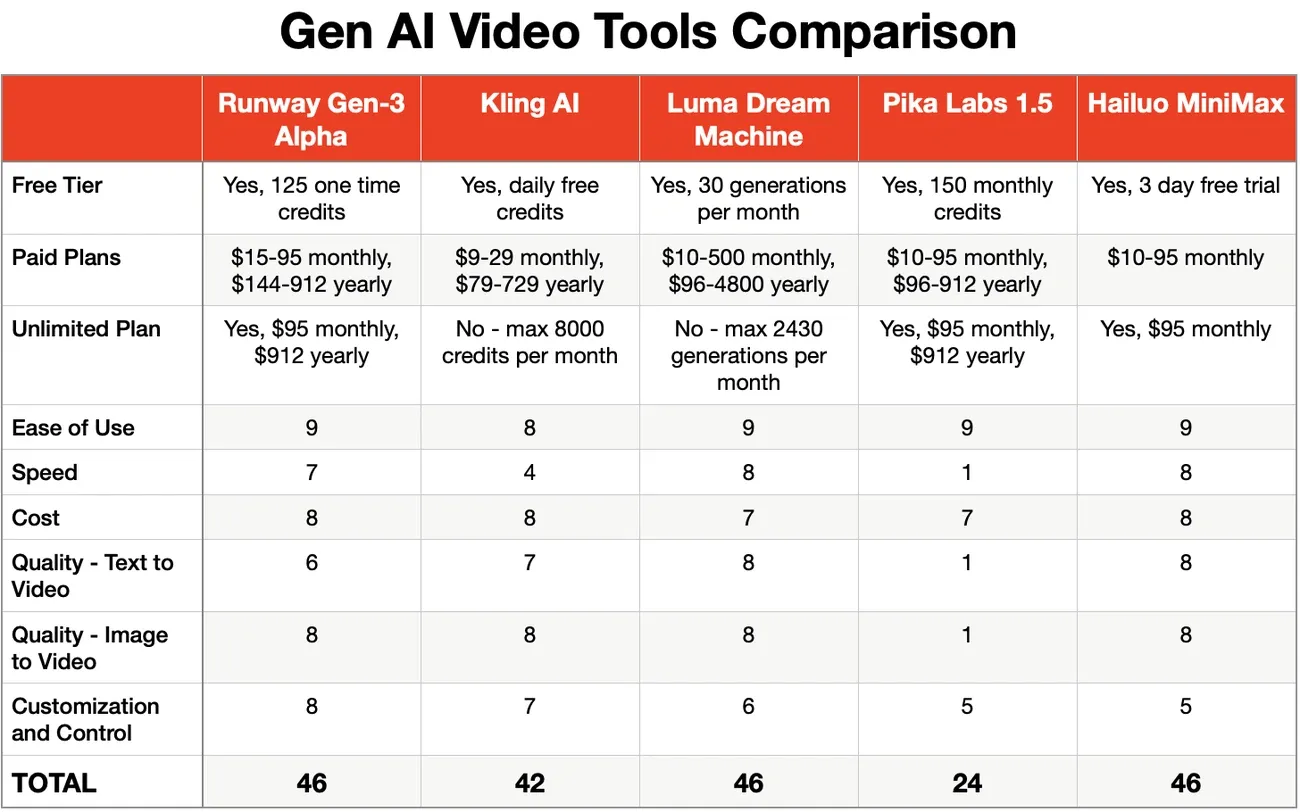
Image Source: Hotel AI, Marketing, Tech and Loyalty
I learned about Runway’s features and needed to figure out which pricing plan would work best for my 30-day experiment. Runway uses a tiered pricing model with a credit-based system that shapes what you can create and how much content you can make.
Free vs paid plans breakdown
Runway has four main pricing tiers that fit different user needs:
|
Plan |
Monthly Cost |
Credits |
Key Limitations |
|
Free |
$0 |
125 (one-time) |
720p max, watermarked exports |
|
Standard |
$12-15 |
625 monthly |
1080p max resolution |
|
Pro |
$28-35 |
2,250 monthly |
Higher quality exports |
|
Unlimited |
$76-95 |
2,250 + unlimited video generation in Explore Mode |
4K+ customizable resolution |
The free plan works mainly as a trial and lets you generate about 25 seconds of Gen-4 Turbo video [9]. Paid plans give you much more room to work with. The Standard plan lets you create around 52 seconds of Gen-4 video or 125 seconds of Gen-4 Turbo monthly [9].
Credit system explained
Credits work like Runway’s own currency, and each type of generation uses a specific amount. My testing showed these credit rates:
-
1 second of Gen-4 Video: 12 credits
-
1 second of Gen-4 Turbo Video: 5 credits
-
1 second of Gen-4 Aleph: 15 credits
-
1 1080p Gen-4 Image: 8 credits
-
1 720p Gen-4 Image: 5 credits [10]
A typical 5-second video clip needs 60 credits with Gen-4, or 25 credits with Gen-4 Turbo. Your monthly credits start fresh on your billing date and don’t carry over [10]. Any extra credits you buy never expire.
Best value plan for creators
I picked the Pro plan because it gave me the best balance for regular content creation. The 2,250 monthly credits let me make about 187 seconds of Gen-4 video or 450 seconds of Gen-4 Turbo video [9]. This worked well for my experiment without needing to buy extra credits often.
The Pro plan gives you better value at about $11.23 per minute of generated video [4], compared to the Standard plan’s $17.30 per minute. The Unlimited plan lets you generate more through its Explore Mode, but its higher price ($76-95/month) didn’t make sense for what I needed.
Hidden costs and limitations
I ran into some unexpected limits while using Runway. Failed generations still use up your credits but give you nothing usable – something to keep in mind when planning your budget. The “unlimited” tier isn’t truly unlimited. It comes with “relaxed mode” queues and possible limits if you use it too much [4].
The credit costs can be tricky sometimes. Some generations used twice the credits I expected [4]. Even with the Pro plan, you might need to buy more credits ($0.01 each) if you’re making long or many videos [11].
The monthly credit reset means you lose any unused credits [10]. This could reduce your plan’s value if you don’t use it consistently each month.
What I Loved and What Needs Work
Image Source: Cybernews
My month-long intensive test run with Runway AI revealed some exceptional features and a few areas that need work. This hands-on experience gave me a clear picture of what works and what doesn’t.
Top 3 standout features
The video generator stands out as Runway’s most impressive tool. It creates polished, high-quality outputs that need minimal editing and are ready to share on social media [3]. The Remove Background feature makes traditional green screens obsolete. It spots foreground elements with amazing accuracy and handles tricky edges like hair and see-through materials well [3]. The Motion Brush tool rounds out the top three. Users can pick up to five subjects in a scene and direct their motion paths. This makes complex animations possible with just a few clicks [5].
Interface and usability issues
Runway’s interface offers mixed results. The platform has a user-friendly interface [3], but some tools don’t work smoothly because of complicated settings [3]. Text-to-Video, Image-to-Video, and similar generators need exact prompt wording. New users often feel frustrated trying to get good results without mastering these details [3]. The Gen-3 version works better than older versions [3], which shows the company listens to user feedback.
Image generation quality concerns
Image quality changes a lot based on how you write your prompt [3]. Users say Runway’s image generation doesn’t match up to specialized tools like Midjourney [12]. Credit consumption creates another headache – failed generations eat up credits but give nothing usable [4]. Complex scenes often come with problems like floating limbs, weird faces, and physics that just don’t look right [4].
Community feedback and support
Runway has built active communities on Discord, Twitter, and Reddit where users talk directly to the development team [13]. Support response times vary widely – some users wait 5-14 days for answers [4]. The company offers live expert help through their Discord channel [13]. Daily challenges let users earn credits and get featured in weekly livestreams [13]. User opinions split between those who love the software and others who struggle with it [3].
Who Should Use Runway AI (And Who Shouldn’t)?
The right audience for Runway AI depends on both technical requirements and creative objectives. Some user groups get the most value from the platform, while others might face certain constraints.
Best fit: marketers, educators, filmmakers
Content marketers love Runway AI’s quick output capabilities to create social media assets and promotional materials. The platform shines at producing short-form video content that campaigns need for visual variety. Educators can use the tool to create engaging instructional videos that bring complex concepts to life without any filming gear. Filmmakers and video producers now have access to special effects and motion graphics that used to need heavy post-production work. The tool serves as a great way to pre-visualize and storyboard complex scenes.
Not ideal for: offline users, static image creators
Runway AI needs smooth internet connectivity, which rules out users working in remote locations with limited access. Static image creators might find better options in dedicated image generation platforms that offer more specific controls. Users who need long-form video production could hit roadblocks with the platform’s credit usage and clip length limits.
Team collaboration and enterprise use
Runway’s team workspace features make shared projects possible where team members can access, edit and give feedback at the same time. This works great for creative agencies that handle client projects needing frequent updates. The enterprise tier adds more admin controls, which suits larger organizations that need permission settings and consistent brand deliverables.
Conclusion
Runway AI has definitely earned its spot as a groundbreaking tool for AI video generation. My 30-day testing showed the platform’s exceptional features, especially when you have its Gen-4 model that keeps visuals consistent across scenes. This unique capability helps creators make narrative-driven content with coherent characters and settings.
The credit system pricing seemed complex at first but makes perfect sense once you get used to it. The Pro plan gives creators the best value, with enough credits to experiment without overspending. The platform’s biggest problem is how failed generations still use up your credits – something Runway needs to fix.
Without doubt, the platform excels at creating short-form content for social media, promotions, and education. Its background removal tool eliminates any need for green screens. The motion brush feature lets you control animated elements with unprecedented precision. These features alone make the subscription worth it for many professionals.
In spite of that, Runway AI doesn’t deal very well with certain limitations. New users often find the interface overwhelming while they learn prompt creation. The image quality also varies based on your prompt expertise, and you can’t work offline at all.
Runway works great for specific groups – marketers who need quick social assets, educators explaining complex ideas, and filmmakers using pre-visualization tools. However, users who focus on static images or need offline access should consider other options.
The platform revolutionizes video production by making it more democratic. It turns complex tasks that needed expensive equipment into creative possibilities you can achieve with a few clicks and well-crafted prompts. Despite some flaws, Runway AI proves to be a valuable tool for content creators, though you should match its strengths to your creative needs.
Key Takeaways
After 30 days of hands-on testing, here are the essential insights about Runway AI’s capabilities and limitations for content creators:
• Gen-4’s visual consistency breakthrough: Runway AI can now maintain consistent characters and objects across different scenes using just a single reference image, solving a major AI video generation problem.
• Credit system requires strategic planning: Failed generations still consume credits, and monthly credits don’t roll over, making the Pro plan ($28-35) the best value at $11.23 per minute of video.
• Best for short-form content creation: Excels at producing 5-10 second clips for social media, promotional materials, and educational content, but struggles with long-form video production.
• Steep learning curve with powerful payoff: Interface can overwhelm beginners, but mastering prompt formulation unlocks professional-quality results without expensive equipment or green screens.
• Target audience matters significantly: Ideal for marketers, educators, and filmmakers needing quick turnaround content, but not suitable for offline users or those primarily creating static images.
Runway AI represents a significant leap forward in democratizing video production, transforming complex post-production tasks into accessible creative tools. However, success depends heavily on understanding its credit system, mastering prompt techniques, and aligning expectations with its strengths in short-form content generation.
FAQs
Q1. Is Runway AI worth the subscription cost? The value of a Runway AI subscription depends on your specific needs and usage. While it offers powerful features for content creators, especially for short-form video production, the credit system and learning curve may impact its overall value for some users. Consider your project requirements and budget before committing to a paid plan.
Q2. What does the free version of Runway AI include? Runway AI’s free Basic plan provides 125 one-time credits for content generation. It includes access to 3 video projects, 10 AI Magic Tools, 720p video exports, 5 GB of asset storage, and allows up to three editors. However, it has limitations compared to paid tiers.
Q3. How secure is Runway AI for users? Runway AI prioritizes user security with robust measures in place. The platform is SOC 2 Type II certified, employs over 100 security controls, uses TLS 1.3 encryption, and offers multi-factor authentication. These features, along with role-based access controls, help ensure the safety of user data and projects.
Q4. What are the key differences between Runway AI’s free and paid plans? While the free plan offers basic features, paid plans unlock more advanced capabilities. These include higher resolution exports, increased storage, unlimited video generation (on higher tiers), advanced tools like green screen removal, and collaboration features. Paid plans also provide significantly more monthly credits for content creation.
Q5. How user-friendly is Runway AI for beginners? Runway AI has a mixed user experience for beginners. While its interface is generally intuitive, mastering prompt formulation and navigating some of the more advanced tools can present a learning curve. However, with practice, users can achieve professional-quality results without the need for expensive equipment or extensive technical knowledge.
References
[1] – https://focalml.com/blog/runway-gen-4-guide-whats-new-and-how-to-use-the-latest-ai-video-model/
[2] – https://learnprompting.org/blog/guide-runwayml?srsltid=AfmBOoo-iOedrW1cHc8qzrJnFoRzwUO3DzEG-6neQf-UYDQ3VnWBH39Q
[3] – https://www.bitdegree.org/ai/runway-ai-review
[4] – https://autoposting.ai/runway-ml-review/
[5] – https://cybernews.com/ai-tools/runway-ai-review/
[6] – https://help.runwayml.com/hc/en-us/articles/37327109429011-Creating-with-Gen-4-Video
[7] – https://runwayml.com/research/introducing-runway-gen-4
[8] – https://learnprompting.org/blog/guide-runwayml?srsltid=AfmBOoqeR2kp2bjInPvUU0dxiJfSuWwAt5Q_pdArVrCdyquczoZtorRk
[9] – https://runwayml.com/pricing
[10] – https://help.runwayml.com/hc/en-us/articles/15124877443219-How-do-credits-work
[11] – https://academy.runwayml.com/getting-started/generation-credits
[12] – https://monica.im/blog/runway-ai-review/
[13] – https://help.runwayml.com/hc/en-us/articles/4402586286355-Runway-by-the-community