

 The numbers tell an amazing story – 91% of middle-market companies now prioritize creating generative AI, up from 77% last year .
The economic outlook might be uncertain, but U.S. CEOs aren’t holding back. A solid 72% of them rank generative AI as their top investment priority . Startup funding in this space hit $21.8 billion across 426 deals in 2023 . These huge investments make sense – the technology helps businesses remain competitive in remarkable ways .
Building an AI model might feel daunting at first. The good news is that beginners can now access these tools and knowledge more easily than ever . Generative AI models pack incredible features that once belonged in science fiction. They create visuals from scratch and handle tasks like retouching and background removal .
This piece breaks down the process of building generative AI into bite-sized chunks. You’ll find practical code examples and clear explanations for text, image, audio, and code generation.
Ready to build your first generative AI model? Let’s explore!
Step 1: Understand What Generative AI Is
Image Source: ResearchGate
You need to understand what generative AI is and how it is different from other AI systems before you start creating your own model. This basic knowledge will guide your development process and help you choose the right approach for your specific project.
What makes generative AI different from traditional AI
Generative AI represents a fundamental change in artificial intelligence capabilities. Traditional AI systems analyze existing data and make predictions based on patterns they identify, while generative AI creates entirely new content that resembles its training data [1].
Traditional AI excels at pattern recognition, and generative AI specializes in pattern creation [2]. This difference marks the most important progress in AI technology. A traditional AI system might analyze an image and tell you, “This is a cat,” but a generative AI model creates a brand new image of a cat or writes a story about one [1].
The creative ability makes generative AI valuable to create AI models that produce original content in a variety of domains. These systems generate text, images, audio, code, and even 3D models by learning the underlying patterns and distributions from massive datasets [3].
Researchers found the promise of new generative AI models in the mid-2010s [4]. These technologies have grown faster since then, leading to systems like ChatGPT in November 2022, which created unprecedented interest in generative AI applications [5].
Types of generative models: GANs, VAEs, Transformers
You’ll likely work with one of these three main architectures to create a generative AI model:
Generative Adversarial Networks (GANs) emerged in 2014 and feature a competitive design [3]. GANs consist of two neural networks in a contest:
-
A generator that creates content
-
A discriminator that reviews whether that content is real or fake
The generator improves as it tries to create outputs realistic enough to fool the discriminator [4]. This adversarial process makes GANs fluent in producing realistic images and videos, making them ideal for computer vision tasks [4].
Variational Autoencoders (VAEs) came in 2013 and use an encoder-decoder architecture that compresses input data into a lower-dimensional “latent space” before expanding it to generate new content [3]. VAEs encode data as a probability distribution rather than fixed values, which enables them to generate multiple varied outputs [4]. They excel at data compression, anomaly detection, and feature learning and offer more stable training than GANs [3].
Transformers changed natural language processing when Google introduced them in 2017 [3]. Their innovative self-attention mechanism allows the model to focus on different parts of the input data at once and captures context across large sequences [3]. This parallel processing capability makes transformers effective at generating coherent, contextually relevant text [4].
Transformers form the foundation for today’s most powerful large language models (LLMs), including OpenAI’s GPT series, Anthropic’s Claude, Meta’s Llama, Google’s Gemini, and IBM’s Granite [3]. GPT-4’s astonishing 1.76 trillion parameters demonstrate unprecedented capabilities in understanding and generating human language [4].
Understanding these architectural differences will help you select the most appropriate model type for your specific use case as you begin to create generative AI from scratch. Each architecture has distinct strengths and limitations that directly affect how to build generative AI systems effectively.
Step 2: Define the Problem You Want to Solve
A clear problem statement forms the foundation of every successful generative AI project. Your AI model won’t deliver results that matter without it, no matter how advanced it is. Research shows that clear objectives are vital to the success of your generative AI initiative [5].
Identify the use case: text, image, audio, or code
Your first step is to pick the type of content you want your generative AI to create. Each type needs a different approach:
Text Generation: This field leads the way in generative AI [6]. You can use it for writing help, creative content, personal assistants, and copywriting [7]. Large language models work best for these text-based tasks.
Image Creation: You can create realistic photos, artistic works, 3D images, avatars, and illustrations with visual generative AI [6]. Think about whether you need new images, better existing ones, or specific visual styles.
Audio Synthesis: This new field creates music, speech, and sound effects [6]. Models can turn text into songs and audio clips, or create custom music that meets specific needs.
Code Development: AI helps write, update, and maintain code. It can also make debugging and app testing easier [8]. Code generation might be your best choice if you want to speed up development.
The type of content you choose points to the best model for your needs—GANs for lifelike images, transformers for text and code, or special audio models for sound.
Set clear goals and success metrics
You need measurable goals and success metrics after picking your use case. These help you see if your AI project adds value.
Look at your organization’s bigger strategic goals first. Your AI work should help achieve broader business goals like better customer experience, smoother operations, or new breakthroughs [5].
Here are the key metrics to think about:
-
Model Quality Metrics: These show how well your AI model’s output works [5]. For AI that creates open-ended content like creative text or images, you might need to judge creativity, accuracy, and relevance.
-
System Metrics: These make sure your AI system runs well, reliably, and can grow [5].
-
Business Operational Metrics: These link technical quality to money matters, showing the real value of your AI work [5]. Look at:
-
Money indicators like more revenue or less cost
-
Operation improvements like better productivity or saved time
-
Customer feedback like satisfaction scores or engagement [5]
-
Every problem needs someone to own it—someone who feels its effects and will put in the work to fix it [9]. Leaders shouldn’t invest in problems that no one owns.
Note that changes to AI systems can help one measure but hurt another [5]. You’ll need to balance these effects when setting your success measures.
A good problem definition shows that your AI product fixes a real issue or creates value, which makes it more likely to succeed [10]. This becomes your guide to keep the team focused as they build the solution.
Step 3: Choose the Right Model and Tools
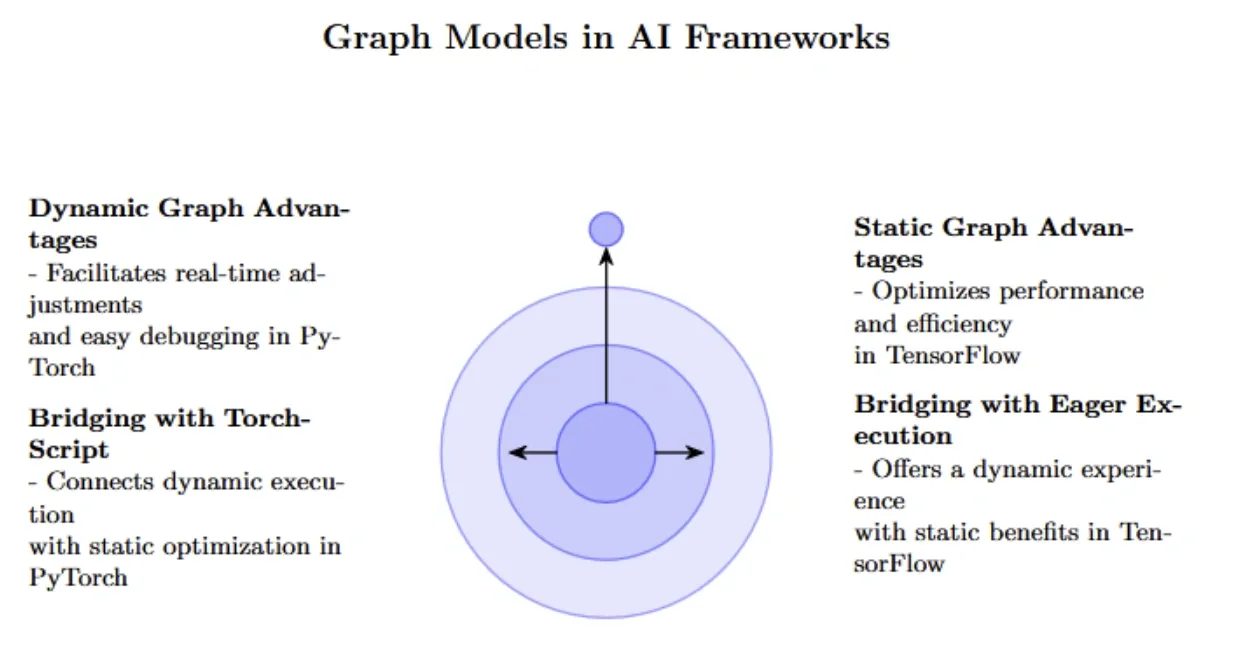
Image Source: DigitalOcean
The right model and tools make all the difference when you learn to create generative AI. Your choice will affect development time and the quality of your final output. Let me walk you through the most important things to think about during this vital step.
Using pre-trained models vs. building from scratch
You face a simple choice when creating AI models: use existing pre-trained models or build your own. Several factors should guide this decision.
Pre-trained models give you speed and accessibility advantages. They save development time because they come trained and optimized for general tasks. You can implement them within days instead of months [11]. These models have proven their worth across many applications, especially for common tasks like text classification or image recognition [11].
In spite of that, custom models deliver better precision and adaptability for specific use cases. Your application might represent a competitive edge—like fraud detection or dynamic pricing. You might want to protect that intellectual property with an in-house model [1]. Custom models also let you control behavior better. You can set specific tone, format, and compliance filters [1].
Ask yourself these questions before deciding:
-
How vital is this model for your long-term competitive edge?
-
Does a public model already do what you need?
-
Do you have enough labeled data, and can you keep it safe?
-
Does your domain use specialized terminology?
-
Can you invest the time and resources needed for custom development?
Cost deserves serious attention. Pre-trained models look cheaper at first, but usage fees add up as volume grows. Custom models need big upfront investment but might cost less over time [1].
Popular frameworks: PyTorch, TensorFlow, Hugging Face
Three frameworks stand out when building generative AI:
PyTorch gives researchers flexibility with dynamic computation graphs. This makes it perfect for quick prototyping and experiments [2]. Its straightforward design has caught on with researchers. 70-80% of top AI research papers now use PyTorch [2]. The framework shines at creating generative models thanks to libraries like PyTorch Lightning [12].
TensorFlow, Google’s creation, excels at scalability and production readiness [2]. You can deploy it anywhere—from laptops to Google’s custom TPUs, phones (via TensorFlow Lite), and browsers (via TensorFlow.js) [2]. This versatility makes TensorFlow valuable for enterprise-scale AI adoption.
Hugging Face has altered the map by solving a different challenge: access to pre-trained models and datasets [2]. Their Transformers library helps developers fine-tune advanced models like BERT and GPT on custom data with minimal code [13]. The platform now hosts over 1 million model checkpoints [14]. Many call it the “GitHub of AI models” because of its community-first approach [2].
How to create a generative AI model using Python
Python leads the way in creating generative AI models thanks to its rich ecosystem of libraries. Here’s how you can start:
Set up your environment with these dependencies:
# Install required libraries
pip install tensorflow numpy matplotlib
Build your model architecture. Here’s a simple GAN implementation:
from tensorflow.keras.models import Sequential
from tensorflow.keras.layers import Dense, LeakyReLU, Reshape

# Define generator model
def build_generator():
    model = Sequential()
    model.add(Dense(128, input_dim=100))
    model.add(LeakyReLU(alpha=0.2))
    model.add(Dense(28 * 28, activation='tanh'))
    model.add(Reshape((28, 28)))
    return model
Compile your model and get ready for training:
from tensorflow.keras.optimizers import Adam

# Build and compile the discriminator
discriminator = build_discriminator()
discriminator.compile(optimizer=Adam(0.0002, 0.5),
                      loss='binary_crossentropy')

# Build generator and GAN
generator = build_generator()
These steps and the right tools will help you create your first generative AI model.
Step 4: Collect and Prepare Your Dataset
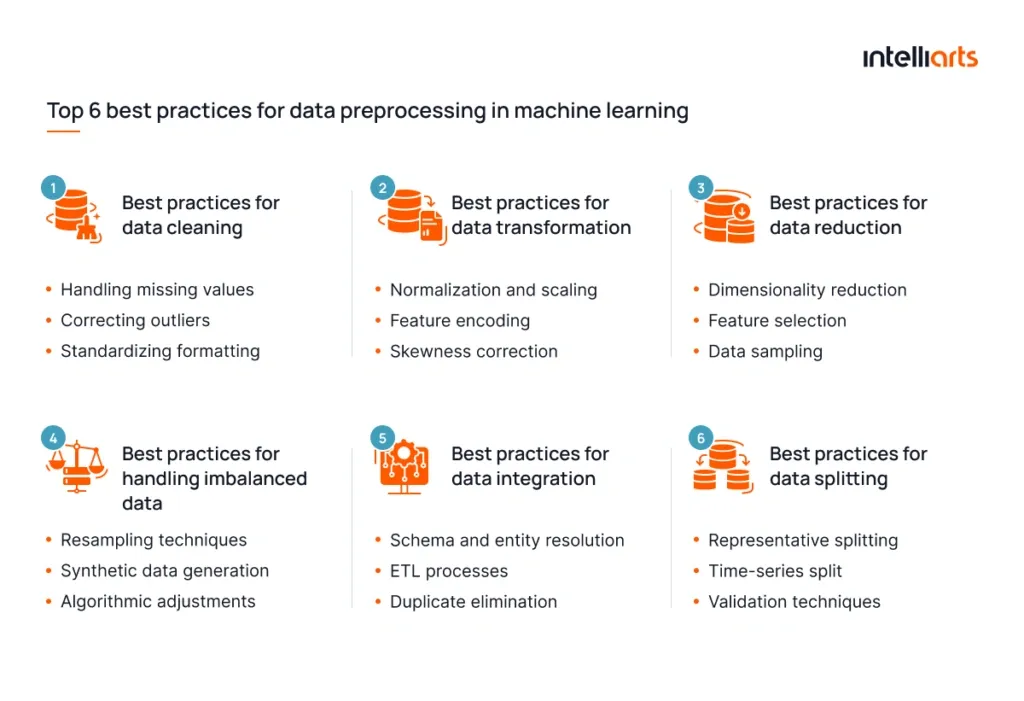
Image Source: Intelliarts
The performance of any generative AI model depends heavily on your dataset’s quality. In fact, unstructured data accounts for over 80% of all business data today [4], but only 18% of businesses can utilize it [4]. Your AI model’s success starts with getting your data right.
Where to find datasets for generative AI
Creating generative AI begins with finding the right datasets. Here are some excellent sources you can explore:
Industry-Specific Datasets: Companies like Defined.ai offer custom datasets for specific industries including STEM, Banking, Finance, Gaming, Insurance, Retail, E-commerce, and Telco [15]. These carefully curated collections will give a solid foundation of relevant and specialized information to develop your models.
Open-Source Options: Open-source datasets are building blocks for multimodal generative AI models. They make AI more accessible by offering rich collections of data that connect different modalities like text, images, and audio [16]. Beginners find these datasets valuable because of their diverse content and detailed annotations.
Synthetic Data Generation: Generative AI can help create its own training data. This approach helps with data augmentation, privacy protection, and keeps costs down [17]. Healthcare applications benefit from synthetic data, especially when real-life data gets pricey or takes too long to gather.
Data cleaning and preprocessing techniques
Data preparation involves collecting, cleaning, labeling, and transforming data to make it ready for AI model training [18]. This vital step will give a reliable and effective generative AI system.
The cleaning process usually includes these key techniques:
-
Handling missing values through methods like mean imputation or predictive models
-
Removing duplicates to avoid skewed analysis and unwanted effects
-
Standardizing formats to keep data consistent across various sources
-
Addressing outliers that could hurt your model’s performance
-
Removing noise by fixing random errors or inconsistencies
Data transformation puts all numerical values on the same scale [18]. This normalization makes information from different sources standard, helping your generative AI model spot patterns and make accurate predictions.
Data scientists spend up to 80% of their time preparing data for analysis [19]. This time investment pays off substantially – poor quality data can lead to biased, inaccurate outputs and affect model performance.
Labeling and formatting for training
Your generative AI’s success depends on well-labeled training data [3]. Labels give context that helps AI learn how to create new content based on data patterns.
Each data type needs its own labeling approach:
Text data needs labels for tone, intent, and domain. ChatGPT learned from over 160,000 labeled dialogs between human participants [20].
Image data needs precise labels that define objects, styles, or emotions. These annotations should show both objects and how they relate to each other [3].
Audio data works best with labels for genre, tone, tempo, and instruments. Speech annotations should include emotion and dialect details [3].
Labeling data comes with its challenges, especially in creative fields where labels can be open to interpretation. Large datasets make the labeling process time-consuming and can get pricey [3].
AI-assisted labeling tools can speed up this work by suggesting labels while keeping human oversight. This human-in-the-loop method balances speed and accuracy effectively [3].
Time spent collecting and preparing your dataset properly increases your chances of building a generative AI model that produces accurate, meaningful results.
Step 5: Train and Fine-Tune Your Model
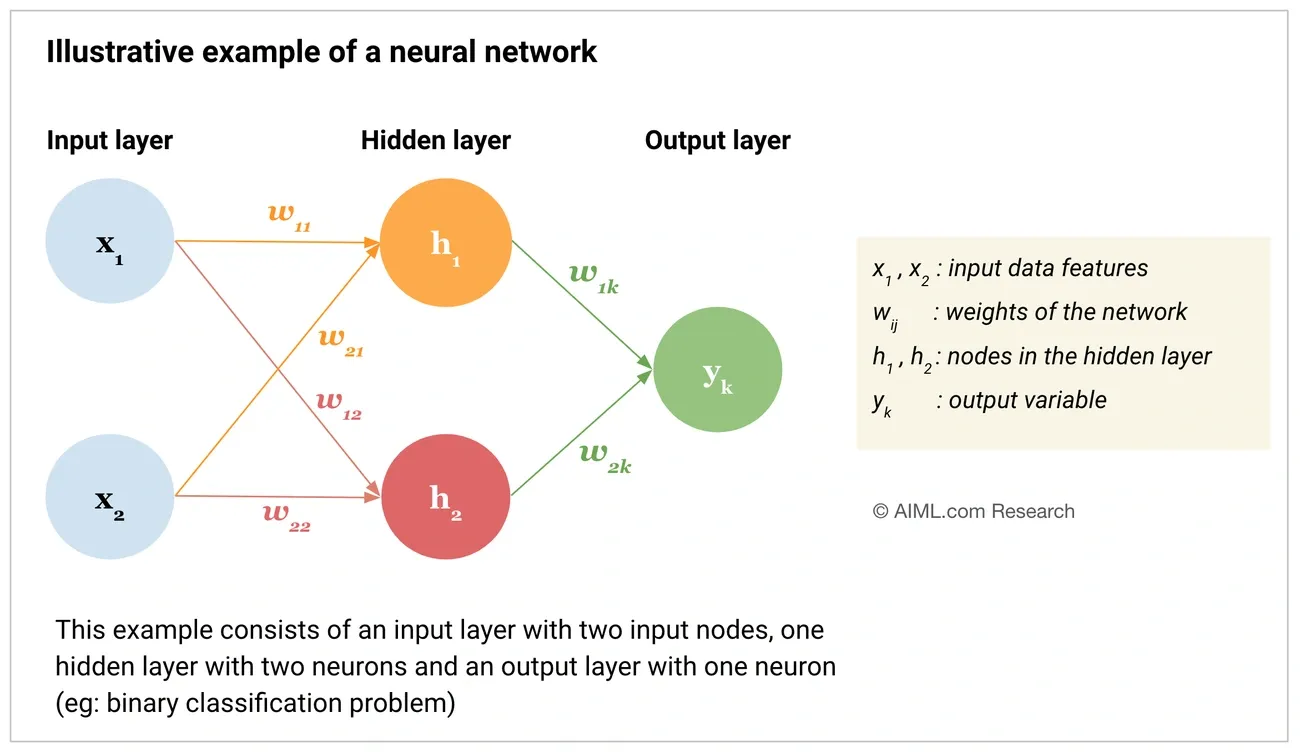
Image Source: AIML.com
The next significant phase in creating generative AI involves training and fine-tuning your model after dataset preparation. This stage transforms your architecture and data into a functioning AI system that generates new content.
Simple training loop with code example
The model learns patterns from your data by adjusting its parameters through an iterative training process. Your prepared dataset helps the model identify relationships within it.
Here’s a simple training loop example using PyTorch for a simple GAN:
# Basic GAN training loop
import torch

# Set hyperparameters
learning_rate = 1e-5  # Start with a small learning rate (1e-5 to 1e-3)
batch_size = 32       # Begin with 16 or 32, adjust as needed
epochs = 100

# Create optimizers
generator_optimizer = torch.optim.Adam(generator.parameters(), lr=learning_rate)
discriminator_optimizer = torch.optim.Adam(discriminator.parameters(), lr=learning_rate)

# Training loop
for epoch in range(epochs):
    for batch_idx, real_images in enumerate(dataloader):
        # Train discriminator
        discriminator_optimizer.zero_grad()
        # [Discriminator training code]
        d_loss.backward()
        discriminator_optimizer.step()

        # Train generator
        generator_optimizer.zero_grad()
        # [Generator training code]
        g_loss.backward()
        generator_optimizer.step()

    # Evaluate on validation set
    if epoch % 10 == 0:
        print(f"Epoch {epoch}: Generator loss: {g_loss}, Discriminator loss: {d_loss}")
The model’s performance gets monitored through validation datasets continuously. This allows you to track its learning progress and adjust hyperparameters accordingly.
Fine-tuning a pre-trained model on custom data
You can adapt an existing pre-trained model to your specific task through fine-tuning with a smaller specialized dataset. This approach needs nowhere near as much data and computing resources as training from scratch, making it more available to anyone learning AI model creation.
Fine-tuning’s logic is straightforward. The process provides dual benefits – you can utilize general knowledge from pre-training while developing specific abilities for your use case [21]. Refining a pre-trained model that already has relevant broad knowledge costs less than building one from scratch.
Here’s how to fine-tune a model using Hugging Face’s Transformers library:
from transformers import AutoModelForSequenceClassification, TrainingArguments, Trainer

# Load pre-trained model
model = AutoModelForSequenceClassification.from_pretrained("google-bert/bert-base-cased", num_labels=5)

# Set up training arguments
training_args = TrainingArguments(
    output_dir="my_fine_tuned_model",
    eval_strategy="epoch",
    learning_rate=2e-5,
    per_device_train_batch_size=16,
    num_train_epochs=3
)

# Create Trainer instance
trainer = Trainer(
    model=model,
    args=training_args,
    train_dataset=dataset["train"],
    eval_dataset=dataset["test"],
    compute_metrics=compute_metrics
)

# Start fine-tuning
trainer.train()
You can use fine-tuning to adjust conversational tone, add domain-specific knowledge, or extend capabilities to new tasks entirely [21].
Avoiding overfitting and underfitting
Balancing model complexity stands vital in generative AI model creation. Your model might show excellent performance on training data but poor results on new data – that’s overfitting. The model’s inadequate performance on both training and test data indicates underfitting.
You can spot overfitting by tracking two key metrics: training error rate and testing error rate. A low training error paired with higher testing error usually points to overfitting [22].
These strategies help prevent overfitting:
-
Regularization techniques: L1 (Lasso), L2 (Ridge), or dropout regularization penalize model complexity effectively [21].
-
Data augmentation: Your dataset expands artificially through paraphrasing, back-translation, or word replacement [23].
-
Cross-validation: Multiple data subsets ensure consistent model performance [7].
-
Early stopping: Training stops when validation performance plateaus to prevent training data memorization [24].
The model’s complexity needs an increase to address underfitting. You might also reduce regularization strength, improve feature selection, or allow more training time [22].
The perfect balance creates a model with low bias and variance that works well with new data. Strategic application of these techniques and careful validation performance monitoring will help you create generative AI models. These models will produce high-quality outputs consistently across various inputs.
Step 6: Add Context with Retrieval-Augmented Generation (RAG)
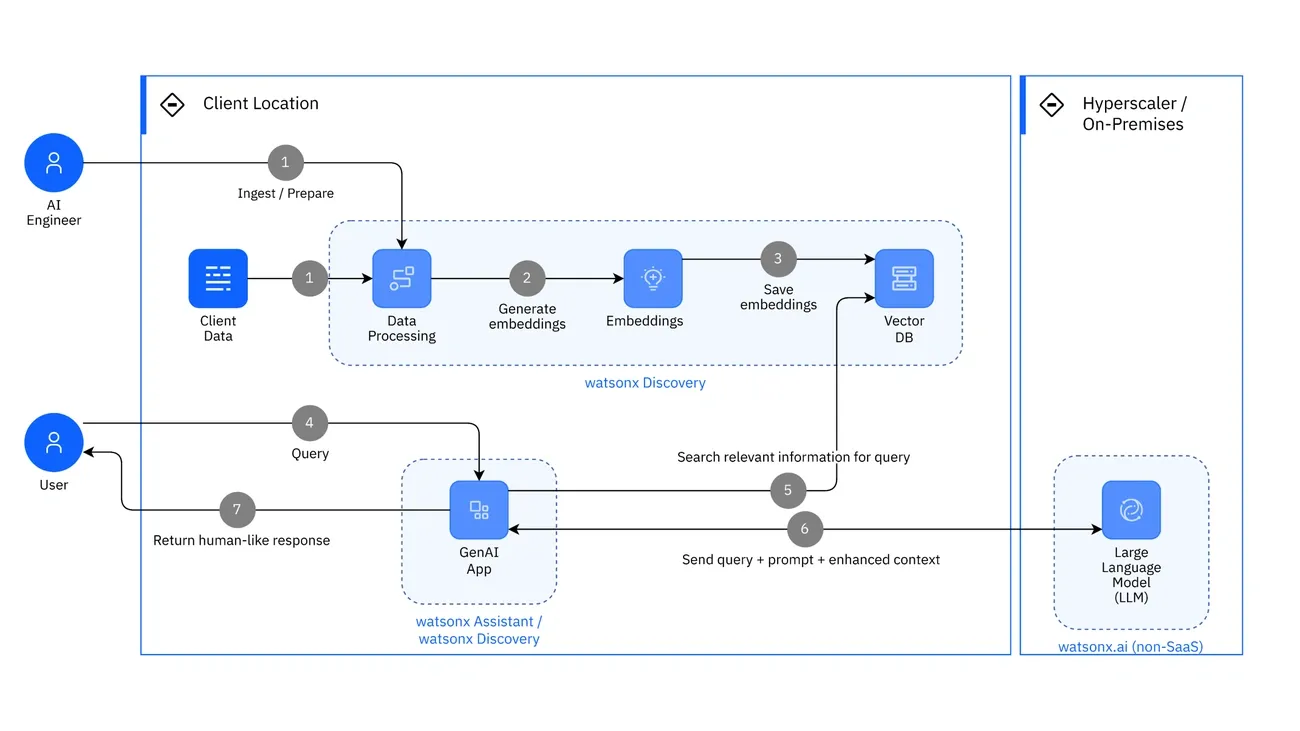
Image Source: IBM
Your generative AI model needs external knowledge sources to take the next big step forward. Retrieval-Augmented Generation (RAG) helps your model perform better than its training data allows.
What is RAG and why it matters
Retrieval-Augmented Generation connects generative AI models with external knowledge bases. This technique lets models check authoritative information before generating responses [25]. RAG includes an information retrieval component that pulls relevant data from external sources based on user input and improves output quality [25].
Standard Large Language Models (LLMs) have several limitations that RAG addresses:
-
Reduces hallucinations (false information generation)
-
Provides access to current, domain-specific knowledge
-
Offers citations to build user trust
-
Extends capabilities beyond training data cutoff dates [26]
RAG lets you make your model work better without expensive retraining. IBM states this makes RAG an economical solution when adapting generative AI to specific domains [26].
How to use vector databases like Pinecone or FAISS
Vector databases are the foundations of effective RAG systems. They store and retrieve vector embeddings—numerical representations that capture semantic meaning. These specialized databases work better than standalone vector indices by offering:
-
Better data management capabilities
-
Real-time updates without reindexing
-
Improved integration with data processing ecosystems [27]
Vector search implementation requires breaking down your knowledge base into smaller chunks (typically a few hundred tokens). These chunks convert into vector embeddings through an embedding model [28]. You can store these embeddings in vector databases like Pinecone, FAISS, or Chroma [29].
Integrating RAG with your generative model
RAG works through five main stages:
-
User submits a prompt
-
Information retrieval model queries the knowledge base
-
Relevant information returns to the integration layer
-
RAG system engineers an augmented prompt with improved context
-
LLM creates better output based on the augmented prompt [26]
The best results come from hybrid search that combines vector similarity and traditional keyword-based techniques. This method produced 35% more accurate answers in testing [8]. Graph-based structures (GraphRAG) can also help with complex queries that need relationship understanding [8].
RAG integration in your generative AI development creates models that keep the creative power of LLMs while grounding their outputs in factual, current information.
Step 7: Evaluate and Improve Model Performance
Your generative AI model needs specific metrics and methods to evaluate its performance effectively. The model’s capabilities improve through regular assessment after it becomes operational.
Key metrics: BLEU, FID, perplexity
BLEU (Bilingual Evaluation Understudy) measures text generation quality by comparing machine-generated text with reference text through matching n-grams [6]. Fréchet Inception Distance (FID) helps assess image generation quality by comparing feature distributions between generated and real images [6]. Language models utilize perplexity to quantify sequence prediction accuracy—models perform better with lower scores [6].
Using validation and test sets
Dataset division forms the foundations of unbiased evaluation. The data splits into training, validation, and test sets to prevent overfitting [30]. Model parameters get fine-tuned during development with validation sets, while test sets give the final unbiased performance metrics [31]. Research shows that 10-fold cross-validation gives low bias and variance properties for smaller datasets [31].
Hyperparameter tuning strategies
Model performance substantially changes with hyperparameter optimization. Grid search looks at all parameter combinations but needs extensive computation [5]. Random search gets better results than grid search and costs less computationally [5]. The search becomes more efficient with Bayesian optimization through probabilistic modeling of the goal function [5]. Tools like Optuna, Hyperopt, and Keras Tuner show 20-30% better performance compared to manual tuning [5].
Step 8: Deploy and Monitor Your AI Application
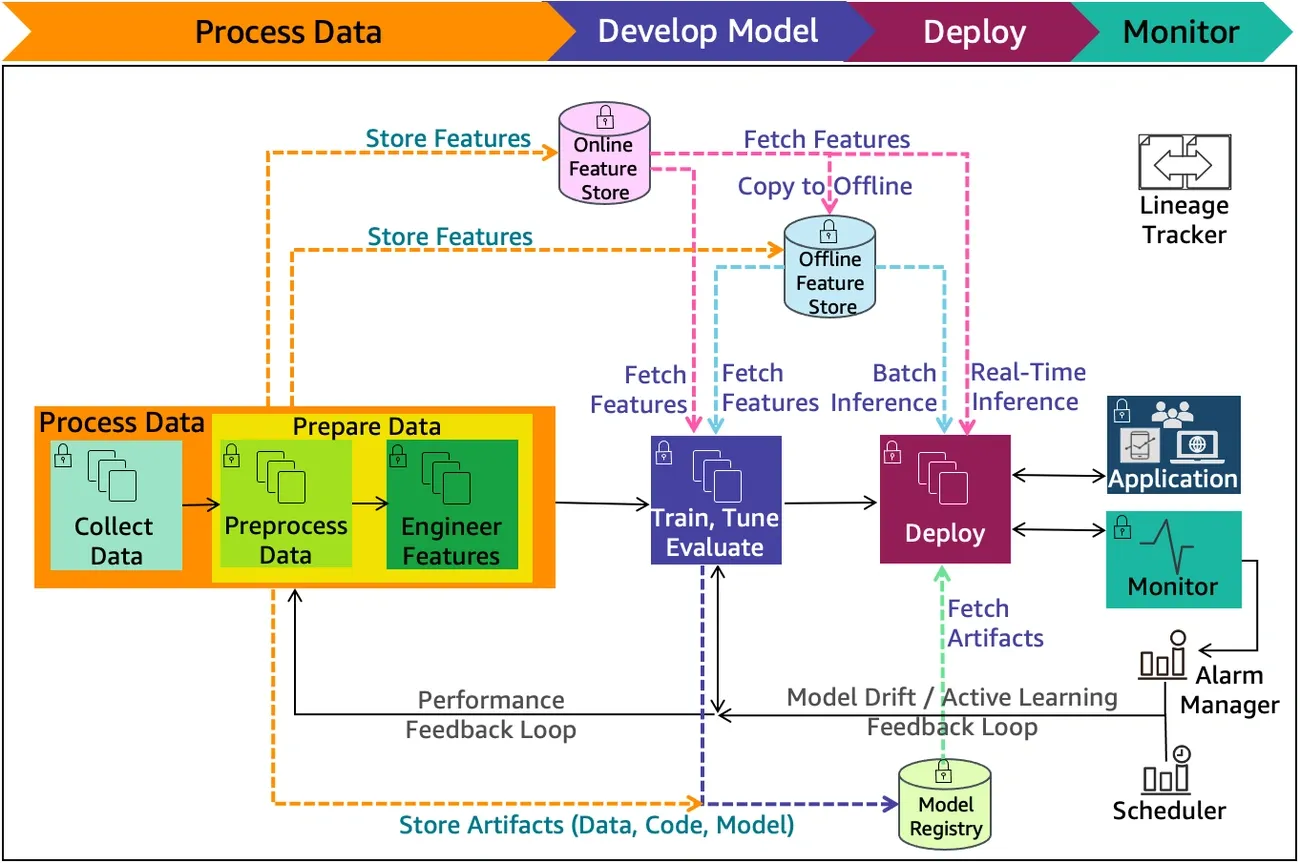
Image Source: AWS Documentation
The final step to create generative AI involves deploying your model where users can access its capabilities. This vital phase will revolutionize your technical creation into a practical application.
Deployment options: cloud vs. local
Cloud deployment gives you better scalability to handle changing workloads by using providers’ advanced AI hardware. However, local deployment reduces latency, improves privacy, and eliminates ongoing usage fees. This makes it perfect for applications that need immediate processing or handle sensitive data. Your choice should align with your needs for cost, privacy, connectivity, and performance.
Using Docker, FastAPI, or Gradio for deployment
Docker containerization will make your generative AI application run consistently in different environments. Start by creating a Dockerfile:
FROM python:3.9
WORKDIR /app
COPY requirements.txt .
RUN pip install -r requirements.txt
COPY . .
CMD ["uvicorn", "app:app", "--host", "0.0.0.0"]
FastAPI helps create high-performance APIs that work well in production environments. Gradio provides an accessible interface to build web UIs without HTML or JavaScript code. This makes it ideal to quickly show your model’s capabilities.
Monitoring and updating your model in production
Your deployed generative AI needs tracking at both application and component levels. You should implement logging in all components and use lineage tracking to find areas that need improvement. Make sure to set up alerts that detect drift, skew, or performance issues.
Conclusion
Building your own generative AI model can feel overwhelming at first. This complete guide simplifies the process into manageable steps that anyone with simple programming knowledge can follow. Each stage builds on the previous one to develop your capabilities as you learn the basic differences between GANs, VAEs, and Transformers before deploying your finished model.
Data quality forms the foundation of any successful generative AI project. Time spent on proper data collection, cleaning, and preprocessing brings better returns through improved model performance. On top of that, it helps that techniques like RAG boost your model’s outputs by grounding them in factual, up-to-date information without expensive retraining.
Success doesn’t end with deployment. Regular monitoring and evaluation help identify areas to improve, while metrics like BLEU, FID, and perplexity give objective measures of your model’s performance. The growing ecosystem of tools, pre-trained models, and deployment options makes generative AI more available than ever before, despite the challenges you might face.
We stand at an exciting frontier where generative AI capabilities grow faster each day. The skills you learn through this piece will help you build models that turn your ideas into reality, whether you want to generate text, images, audio, or code. The path from beginner to proficient AI developer needs dedication, but the potential to create something truly innovative makes every step count.
Key Takeaways
Creating generative AI models is now accessible to beginners with the right approach and tools, transforming complex AI development into manageable steps.
• Start with pre-trained models over building from scratch – Save months of development time by fine-tuning existing models like GPT or BERT for your specific use case.
• Data quality determines model success – Invest 80% of your effort in collecting, cleaning, and properly labeling datasets, as poor data leads to unreliable AI outputs.
• Choose the right architecture for your content type – Use GANs for realistic images, Transformers for text/code generation, and VAEs for data compression tasks.
• Implement RAG to reduce AI hallucinations – Connect your model to external knowledge bases using vector databases like Pinecone to ground outputs in factual information.
• Monitor performance continuously after deployment – Track metrics like BLEU scores for text and FID for images, while setting up alerts for model drift detection.
The democratization of AI development through frameworks like PyTorch, TensorFlow, and Hugging Face means that with proper planning and execution, anyone can build production-ready generative AI applications that solve real-world problems.
FAQs
Q1. How can I create my own generative AI model as a beginner? Start by defining your objective, then choose a pre-trained model to fine-tune rather than building from scratch. Collect and preprocess high-quality data, select an appropriate framework like PyTorch or TensorFlow, and begin training. Use techniques like transfer learning to leverage existing models and speed up development.
Q2. What are the key steps to build a generative AI solution? The key steps include defining your objective, collecting and preprocessing data, choosing a model architecture, training and optimizing the model, deploying and integrating it into your workflow, and continuously monitoring its performance post-deployment. Each step is crucial for creating an effective generative AI solution.
Q3. Is it possible to use generative AI for coding tasks? Yes, generative AI can be used for coding tasks. Recent advancements in large language models (LLMs) and natural language processing (NLP) have made this possible. These models are trained on vast datasets of existing source code, allowing them to generate, complete, and even debug code based on natural language prompts or partial code inputs.
Q4. What tools and frameworks are recommended for beginners creating AI models? For beginners, popular frameworks like PyTorch, TensorFlow, and Hugging Face’s Transformers library are recommended. These offer pre-built models and intuitive APIs. Tools like Google Colab or Jupyter Notebooks provide free, cloud-based environments for experimentation. For deployment, consider user-friendly options like Gradio for quickly creating web interfaces.
Q5. How important is data quality when creating a generative AI model? Data quality is crucial when creating a generative AI model. High-quality, well-labeled data directly impacts the model’s performance and output reliability. It’s often said that data scientists spend up to 80% of their time on data preparation. Investing effort in collecting, cleaning, and properly labeling your dataset will significantly improve your model’s effectiveness and reduce issues like bias or inaccuracies in generated content.
References
[1] – https://www.synergyconsulting.ae/insights/choosing-between-pre-trained-language-models-and-custom-models-a-strategic-guide/
[2] – https://guruworldtechhub.com/open-source-ai-tools-tensorflow-pytorch-and-hugging-face-powering-the-ai-revolution/
[3] – https://www.uber.com/us/en/ai-solutions/resources/data-labeling-for-gen-ai/
[4] – https://aws.amazon.com/blogs/machine-learning/simplify-data-prep-for-gen-ai-with-amazon-sagemaker-data-wrangler/
[5] – https://www.xcubelabs.com/blog/advanced-optimization-techniques-for-generative-ai-models/
[6] – https://encord.com/blog/generative-ai-metrics/
[7] – https://learn.microsoft.com/en-us/azure/machine-learning/concept-manage-ml-pitfalls?view=azureml-api-2
[8] – https://aws.amazon.com/blogs/machine-learning/improving-retrieval-augmented-generation-accuracy-with-graphrag/
[9] – https://strategyofthings.io/successful-ai-starts-with-the-right-problems
[10] – https://www.linkedin.com/pulse/power-great-ai-product-problem-definition-why-matters-harsha-srivatsa-x2qcc
[11] – https://oyelabs.com/custom-ai-models-vs-pre-trained-models/
[12] – https://www.pythoncentral.io/how-to-build-generative-ai-with-python/
[13] – https://dzone.com/articles/6-generative-ai-frameworks-amp-tools-every-develop
[14] – https://huggingface.co/docs/transformers/en/index
[15] – https://defined.ai/category/generative-ai-datasets
[16] – https://www.labellerr.com/blog/top-open-source-datasets-for-multimodal-generative-ai-models/
[17] – https://research.aimultiple.com/data-collection-methods/
[18] – https://boomi.com/blog/data-preparation-ai-basics/
[19] – https://medium.com/@bragadeeshs/automating-data-cleaning-how-generative-ai-streamlines-data-preprocessing-e1ad65370a0c
[20] – https://www.datasciencecentral.com/from-chaos-to-creation-how-data-labeling-drives-success-in-generative-ai/
[21] – https://www.ibm.com/think/topics/fine-tuning
[22] – https://symbl.ai/developers/blog/a-guide-to-overfitting-and-underfitting/
[23] – https://www.iopex.com/blog/fine-tuning-generative-ai-model
[24] – https://www.ibm.com/think/topics/overfitting-vs-underfitting
[25] – https://aws.amazon.com/what-is/retrieval-augmented-generation/
[26] – https://www.ibm.com/think/topics/retrieval-augmented-generation
[27] – https://www.pinecone.io/learn/vector-database/
[28] – https://www.anthropic.com/news/contextual-retrieval
[29] – https://medium.com/@rohanmistry231/a-beginners-guide-to-vector-databases-pinecone-faiss-chroma-explained-d4eb3840f7c8
[30] – https://developers.google.com/machine-learning/crash-course/overfitting/dividing-datasets
[31] – https://www.machinelearningmastery.com/difference-test-validation-datasets/