

 Python Polars processes data at unprecedented speeds and performs common operations 5 to 10 times faster than pandas. This lightning-fast DataFrame library employs Rust to achieve C/C++ level performance while using all available cores on your machine. Some operations in Python Polars run up to 100 times faster than pandas.
Polars manages memory substantially better too. The polars library needs just 2 to 4 times the dataset size to perform operations, while pandas requires 5 to 10 times. Data scientists can handle larger datasets before running into out-of-memory errors because of this efficiency. The polars dataframe syntax proves more user-friendly and easier to remember than pandas for many users. In this piece, we’ll explore how to implement this powerful library in your Python projects and understand its unique features. You’ll see why polars increasingly outperforms pandas for critical data processing tasks.
Installing and Setting Up Polars in Python

Image Source: Real Python
Python Polars has a simple installation process. The library runs well with modern Python environments and gives you several ways to install based on what you need.
Supported Python versions and pip installation
You need Python 3.7 or higher to run Polars. The quickest way to install is through pip, Python’s package manager. Run this command in your terminal:
pip install polars
Polars has a special build for older CPUs without AVX2 support:
pip install polars-lts-cpu
While you can get Polars through conda (conda install -c conda-forge polars), pip works best for most users. Conda exists mainly for developers who use Anaconda to manage their Python environments.
Installing optional features: numpy, pandas, Excel
Polars shines with its modular design that lets you install only what you need. You can add specific optional features like this:
pip install 'polars[numpy,pandas,pyarrow]'
Want everything Polars offers? Use this command:
pip install 'polars[all]'
Excel support needs extra packages. To write Excel files, you’ll need xlsxwriter:
pip install xlsxwriter
Polars reads Excel files using different engines that each need their own package:
-
openpyxl: A popular engine for Excel file operations
-
xlsx2csv: Lightweight converter for Excel to CSV
-
calamine: Another Excel reading engine
This command installs all Excel-related packages:
pip install 'polars[excel]'
You can also install specific engines:
pip install fastexcel xlsx2csv openpyxl
This modular approach keeps things light if you need specific features, or complete if you want full functionality.
Verifying installation with import test
A quick test helps ensure everything works. Just import the library in Python:
import polars as pl
No errors mean success. Most developers use pl as a short name for Polars, just like pandas uses pd.
You can check your Polars version in the command line:
pip show polars
Or in Python:
import polars as pl
print(pl.__version__)
This command shows a complete view of your setup with all optional packages:
pl.show_versions()
It displays your current Polars version and lists all optional dependencies. This helps confirm that you have installed everything correctly.
Your Python environment now has Polars ready to use. You can start learning its powerful DataFrame features and see how much faster it runs compared to pandas.
Creating and Exploring Polars DataFrames
[No content provided to rewrite]
Using Expressions and Contexts in Polars
Image Source: Spark By {Examples}
No source text provided to rewrite.
Understanding the Lazy API and Query Optimization
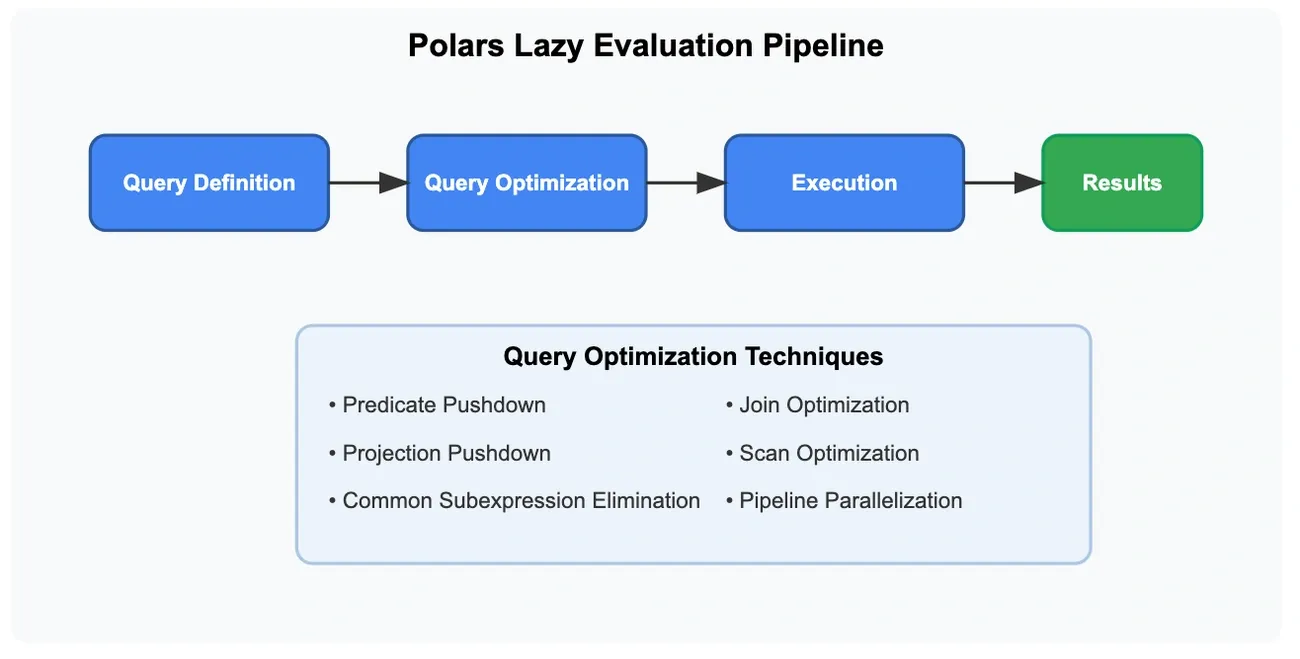
Image Source: Nishant Gupta – Medium
Python Polars’ Lazy API stands out as one of its most powerful features that changes how data processing operations run. The lazy approach builds a complete query plan first instead of running each operation right away. This leads to better performance through smart optimization.
LazyFrame vs DataFrame: key differences
LazyFrame, the main object in Polars’ lazy API, is different by a lot from regular DataFrames. LazyFrames wait to execute operations until specifically asked, while DataFrames run operations right away. This creates several key differences:
Execution Timing:
-
DataFrame: Runs operations right away, line by line
-
LazyFrame: Creates a computational graph of operations that runs only when needed
Memory Efficiency:
-
DataFrame: Creates intermediate results that might use more memory
-
LazyFrame: Makes the entire pipeline more efficient and uses less peak memory
Performance:
-
DataFrame: Works well with small datasets and exploratory work
-
LazyFrame: Performs better with large datasets, running about 2-2.5x faster on complex operations
You can switch between these formats easily:
# From DataFrame to LazyFrame
lazy_df = df.lazy()

# From LazyFrame to DataFrame
df = lazy_df.collect()
LazyFrames are a vital advantage when you work with complex data processing pipelines or datasets too big for memory. The lazy evaluation model lets Polars see the whole query at once instead of processing operations one after another. This enables system-wide improvements that eager evaluation can’t match.
Building query plans with .explain() and .show_graph()
Polars gives you two main ways to check query plans before they run:
-
.explain()– Shows a text version of the query plan -
.show_graph()– Creates a picture of the query plan as a diagram (needs Graphviz)
Here’s how you can see how a query will run using .explain():
import polars as pl

lazy_query = (
    pl.scan_csv("data.csv")
    .filter(pl.col("value") > 100)
    .with_columns(pl.col("name").str.to_uppercase())
    .select(["id", "name", "value"])
)

print(lazy_query.explain())
The output shows the optimized query plan from bottom to top. Each step appears in the order it will happen.
Visual learners might prefer .show_graph() which creates a diagram:
lazy_query.show_graph()
The diagram shows each query stage in boxes. Greek symbols sigma (σ) and pi (π) show filtering and column selection operations.
You can compare optimized and non-optimized plans:
# Non-optimized plan
lazy_query.explain(optimized=False)
lazy_query.show_graph(optimized=False)
Looking at these differences helps you learn about how Polars reorganizes operations to make them run faster.
Predicate pushdown and projection pushdown
Polars uses two main optimization techniques: predicate pushdown and projection pushdown.
Predicate Pushdown: This technique moves filter conditions closer to where the data comes from. Polars filters data while reading instead of loading everything first.
To name just one example, see:
query = (
    pl.scan_csv("large_file.csv")
    .with_columns(pl.col("name").str.to_uppercase())
    .filter(pl.col("value") > 0)
)
Without optimization, it would:
-
Read the entire CSV
-
Change the “name” column to uppercase
-
Filter rows where “value” > 0
With predicate pushdown, Polars changes this to:
-
Read the CSV while filtering for “value” > 0
-
Change only the “name” column of remaining rows
This saves memory and processing time, especially with big datasets.
Projection Pushdown: This technique loads only the columns you need from your data source. Polars skips loading unused columns completely.
These improvements work especially well with Parquet files. When filtering Parquet data, Polars can skip whole sections that don’t match your filters without reading their data.
Executing queries with .collect()
The .collect() method turns a LazyFrame into a regular DataFrame and runs the optimized query plan:
result_df = lazy_query.collect()
You can control how optimizations work:
# Disable specific optimizations
result_df = lazy_query.collect(
    predicate_pushdown=False,
    projection_pushdown=True
)
Since Polars 1.30.0, you get more control over optimization passes with the optimizations parameter.
Large datasets that don’t fit in memory can use streaming:
result_df = lazy_query.collect(engine="streaming")
This processes data in chunks instead of all at once, letting you work with very large datasets even with limited RAM.
If you have the right hardware, you can use GPU acceleration:
result_df = lazy_query.collect(engine="gpu")
The GPU mode is still experimental and not all queries will work on it.
Lazy evaluation combined with advanced query optimization makes Polars really good at processing data. Building the whole operation pipeline before running it lets Polars make improvements that work better than traditional approaches.
Working with External Files and Python Ecosystem

Image Source: Hopsworks
Python Polars excels at working with different file formats and blends naturally with Python’s data ecosystem. This makes it a great choice for projects that need both high performance and compatibility with existing code bases.
scan_csv(), scan_parquet(), scan_ndjson() usage
Polars has special “scan” functions that create LazyFrames from external files. These functions optimize queries before loading data into memory and are the foundations of Polars’ file operations.
The scan_csv() function reads CSV files lazily. This lets Polars push down predicates and projections to the scan level:
lazy_df = pl.scan_csv("data.csv",
                      has_header=True,
                      separator=",",
                      infer_schema_length=100)
scan_csv() has these key parameters:
-
has_header: Shows if the first row has column names -
separator: Character that separates fields -
null_values: Values treated as null -
infer_schema_length: Rows used to infer schema -
schema_overrides: Dictionary specifying column data types
scan_parquet() creates a LazyFrame from Parquet files and optimizes them:
lazy_df = pl.scan_parquet("data.parquet",
                          n_rows=None,
                          use_statistics=True,
                          parallel="auto")
The parallel parameter works with multiple strategies:
-
“auto”: Picks the best parallelization method
-
“columns”: Makes columns parallel
-
“row_groups”: Makes row groups parallel
-
“prefiltered”: Reviews predicates first, then reads needed rows
Large files with selective filtering get significant speed boosts from the prefiltered strategy.
Polars uses scan_ndjson() to handle newline-delimited JSON:
lazy_df = pl.scan_ndjson("data.jsonl",
                         schema=None,
                         batch_size=1024)
NDJSON works better than standard JSON files because each line is an independent JSON object. This helps manage memory better with large files.
These scan functions create query plans without reading data until .collect() or another materializing operation runs. The query optimizer uses this approach to minimize I/O operations and memory usage.
Converting between Polars, pandas, and NumPy
Polars makes it easy to convert data between different Python libraries. This helps it work well with existing code.
Here’s how to convert a Polars DataFrame to pandas:
pandas_df = polars_df.to_pandas(use_pyarrow_extension_array=False)
The use_pyarrow_extension_array parameter controls data sharing:
-
False(default): Copies the data -
True: Uses PyArrow-backed extension arrays without copying
Zero-copy conversion keeps null values exactly as they were in Polars. Standard conversion changes nulls to NaN in numeric columns.
Converting pandas to Polars is just as simple:
polars_df = pl.from_pandas(pandas_df,
                           rechunk=True,
                           nan_to_null=True)
These parameters are important:
-
rechunk: Makes memory layout contiguous -
nan_to_null: Changes pandas NaN values to Polars nulls -
include_index: Keeps the pandas index as a column if needed
NumPy and Polars work together through these conversion methods:
# Polars DataFrame to NumPy array
numpy_array = polars_df.to_numpy(structured=False)

# Series to NumPy array
numpy_array = polars_series.to_numpy()
The structured parameter affects output format:
-
False: Creates a standard 2D NumPy array -
True: Creates a structured array that keeps column names and data types
Zero-copy conversion to NumPy happens only when:
-
Data type is numeric, datetime, or array
-
Series has no null values
-
Series has one chunk
-
writableparameter isFalse
Data gets copied in all other cases.
Exporting to Excel, CSV, and Parquet
Polars lets you export data to common file formats with many options.
Parquet files give better performance and compression:
df.write_parquet("output.parquet",
                 compression="zstd",
                 statistics=True,
                 row_group_size=None)
You can choose different compression options:
-
“zstd”: Best compression performance (default)
-
“lz4”: Quick compression/decompression
-
“snappy”: Works better with older systems
-
“gzip”, “brotli”: Other compression choices
The statistics parameter helps queries run faster when reading files with predicate pushdown.
CSV exports work like this:
df.write_csv("output.csv",
             include_header=True,
             separator=",",
             quote_style="necessary")
quote_style has these options:
-
“necessary”: Quotes only when needed (default)
-
“always”: Quotes everything
-
“non_numeric”: Quotes just non-numeric fields
-
“never”: Uses no quotes
Excel export needs xlsxwriter and has many formatting choices:
df.write_excel("output.xlsx",
               autofit=True,
               column_totals=True)
Excel features include:
-
Conditional formatting
-
Table styles
-
Column totals and formulas
-
Custom column widths
-
Sparklines to show data visually
Parquet works best for sharing data between libraries because of its columnar format and compression. Large datasets sometimes move more efficiently through files than through memory conversion.
Polars stays true to its focus on performance and memory efficiency in all these operations, whether it’s reading files, working with other libraries, or saving results.
Conclusion
Python Polars represents a breakthrough in the Python data processing ecosystem. This piece explores how this Rust-powered library delivers unmatched performance gains, beating pandas by 5-10x for common operations and achieving 100x speedups in some cases. On top of that, it uses memory more efficiently, letting data scientists work with larger datasets before hitting resource limits.
Setting up Polars is simple, with options ranging from basic installations to feature-rich configurations. Users can tailor their environment to project needs without carrying extra dependencies.
Polars’ Lazy API transforms how data processing works. The library builds complete query plans before execution and applies smart optimizations like predicate and projection pushdown. Complex data operations run faster and use less memory. Users can optimize their data processing strategies by visualizing these query plans through .explain() and .show_graph() functions.
The library’s smooth integration with Python’s ecosystem means it works well with existing pandas and NumPy code. Support for many file formats—especially high-performance options like Parquet—makes Polars ideal for production pipelines handling huge datasets.
Data scientists and analysts looking to boost performance should think over Polars for their next project. The library blends intuitive syntax with blazing speed while staying compatible with familiar tools. As datasets grow larger and performance demands increase, Polars offers a powerful solution that optimizes both hardware use and developer productivity.
Key Takeaways
Python Polars revolutionizes data processing with exceptional performance gains and memory efficiency that make it a compelling alternative to pandas for large-scale data operations.
• Polars delivers 5-10x faster performance than pandas with some operations reaching 100x speedups while using 2-4x less memory than pandas’ 5-10x requirement.
• The Lazy API enables powerful query optimization through predicate and projection pushdown, building complete execution plans before processing data.
• Installation is straightforward with modular dependencies allowing users to install only needed features via pip with optional Excel, NumPy, and pandas support.
• Seamless ecosystem integration provides easy conversion between Polars, pandas, and NumPy while supporting multiple file formats including CSV, Parquet, and Excel.
• Query visualization tools like .explain() and .show_graph() help developers understand and optimize their data processing pipelines for maximum efficiency.
The combination of Rust-powered performance, intelligent query optimization, and Python ecosystem compatibility makes Polars an essential tool for data scientists working with large datasets or performance-critical applications.
FAQs
Q1. How much faster is Polars compared to Pandas? Polars typically performs common operations 5-10 times faster than Pandas, with some operations reaching up to 100 times faster. The performance difference is especially noticeable when working with large datasets.
Q2. What are the main advantages of using Polars over Pandas? Polars offers superior performance, better memory efficiency, and a more consistent API. It also provides a Lazy API for query optimization and supports working with larger-than-memory datasets.
Q3. Is Polars difficult to learn for someone familiar with Pandas? Most users find Polars intuitive and easier to learn than Pandas. The syntax is more consistent, and many developers report being able to learn Polars within a week.
Q4. Can Polars work with external files and other Python libraries? Yes, Polars has excellent support for various file formats like CSV, Parquet, and Excel. It also integrates well with other Python libraries, including NumPy, scikit-learn, and machine learning frameworks like PyTorch and JAX.
Q5. Are there any limitations to using Polars? While Polars is highly capable, it’s still in active development. Some users have reported occasional issues with certain operations or data types. Additionally, some specialized features available in Pandas might not yet have direct equivalents in Polars.